Skip to content
TZX Locate عربي Get the betaBeta

In beta on iPhone and Android

Know
they’re
OK.
Without
spying
on them.

TZX Locate is a family location and safety app for the Gulf, starting with Saudi Arabia and the UAE.

A quiet, honest map, arrive‑and‑leave alerts, and trips that keep everyone together. And the person being located can always see who is looking.

One evening in Riyadh, 17:48 to 22:00. Every phone in a frame is a real capture from the app; the cards are drawn in its design.

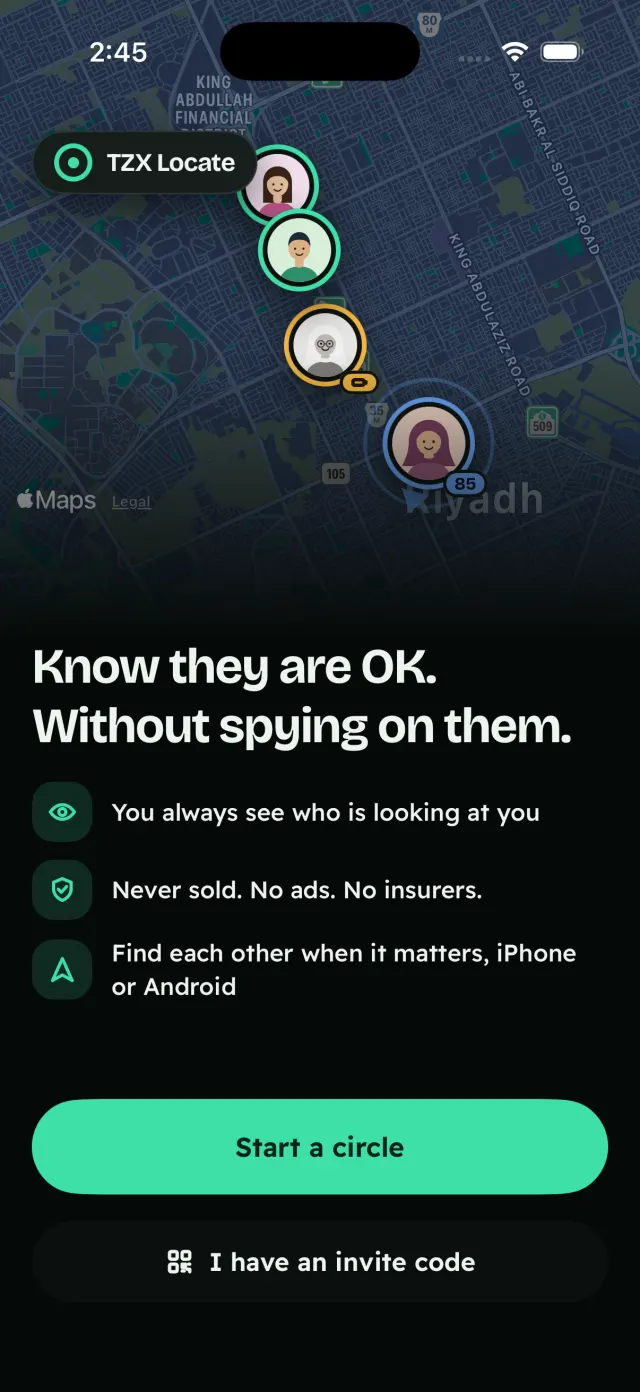
The TZX Locate welcome screen at night: the family on a dark map, the line “Know they are OK. Without spying on them.”, and buttons to start a circle or use an invite code.

17:50The Honest DotFree

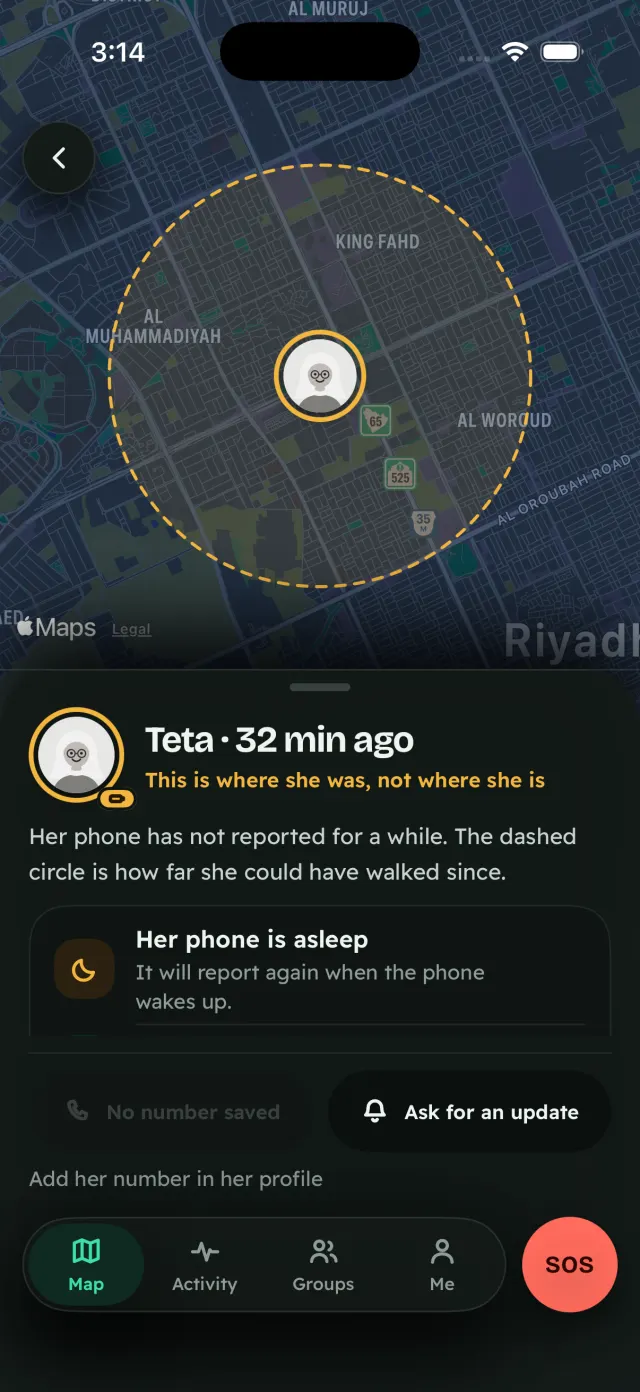
This is where she was, not where she is.

Teta put her phone down for a nap. Drag the slider, or keep scrolling, and watch her dot age: it says how old it is, how sure it is, and why.

  • How old. Every person shows how old their location is. After about two minutes the face turns grey.
  • How sure. The ring around them is the accuracy. A weak fix never gets a place name; it says “approximate”.
  • And why. A plain reason when it’s out of date: “phone asleep”, “no signal”, “battery saver”.

Quiet map, loud people: the map is muted, the faces are the only colour, and every map state has a text twin in the people list.


Teta · Teta’s house

Updated just now.
Fresh fix

Teta’s card at night, 32 minutes old: a dashed circle on the dark map around her last place, the words “This is where she was, not where she is” and “Her phone is asleep”, and a button to ask for an update.

17:52Places & alertsFree, unlimited

Omar got home. The alert says when he really did.

Home, school, the office, Teta’s house: add as many places as you like, each with arrive and leave alerts. Unlimited, and free.

  • Check in with one tap. “I’m here, I’m OK.”
  • No alert behind your back. Alerts someone sets on you are shown to you, on a card you approve once.
  • Your history, on your phone. The activity feed and 7-day history live on your own phone, and you can delete them.

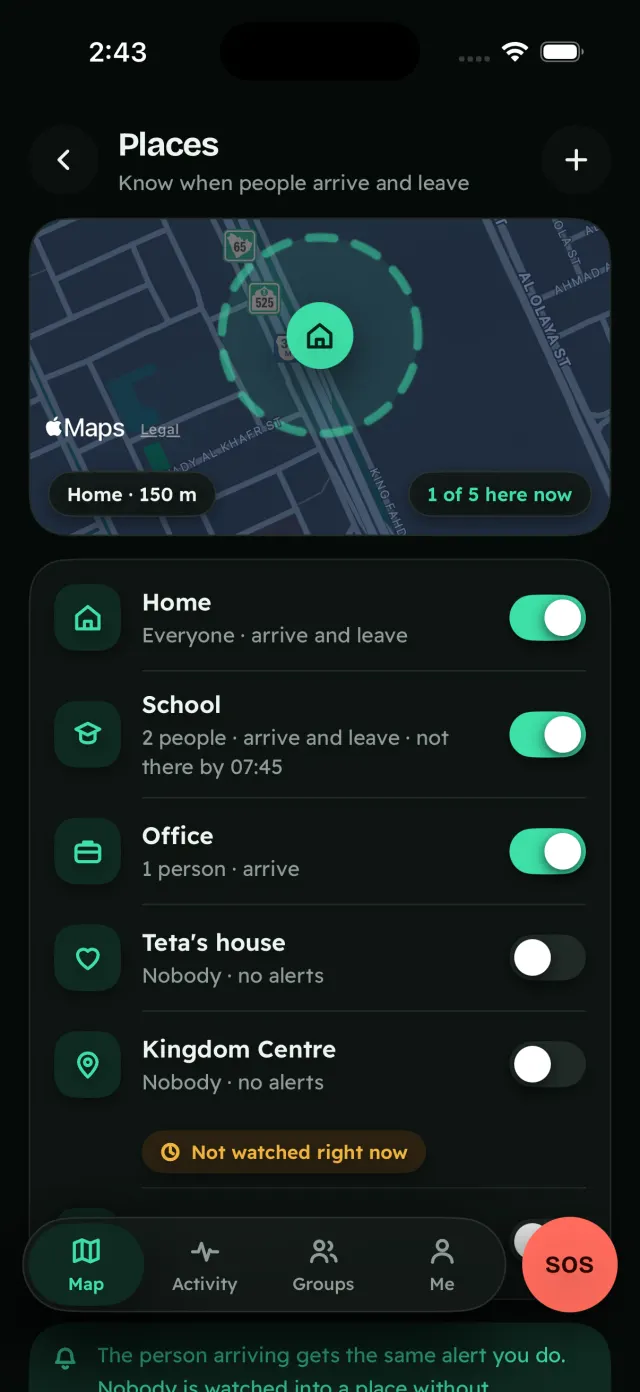
On the Places screen, School’s “not there by 07:45” line is a no-show alert, part of Plus.

  1. Omar arrived at HomeReached you at 17:49 — the alert keeps 17:40
  2. Omar arrived at SchoolArrive alert · on time

A late alert shows its true time, never the time it reached you.

The Places screen: Home with everyone’s arrive and leave alerts, School with two people (its “not there by 07:45” line is a Plus no-show alert), the Office, and Teta’s house.

17:54The mirrorFree

Mum left the office. She knows you’re following.

You always see who is looking at you: a live “looking now” eye on your own pin, and a ledger of who found you, set alerts on you or checked your speed.

And for each person, you choose how precisely they see you:

  1. Exact
  2. Area
  3. City
  4. Off

Each step can be time-boxed, and it shows on your avatar. Pause is quiet for adults: a calm, visible state with no push to the family. And leaving a group never needs anyone’s approval.

Try it · demo

Mum’s mirror

  1. Omar set an arrive alert on you · Home
  2. Dad checked your speed

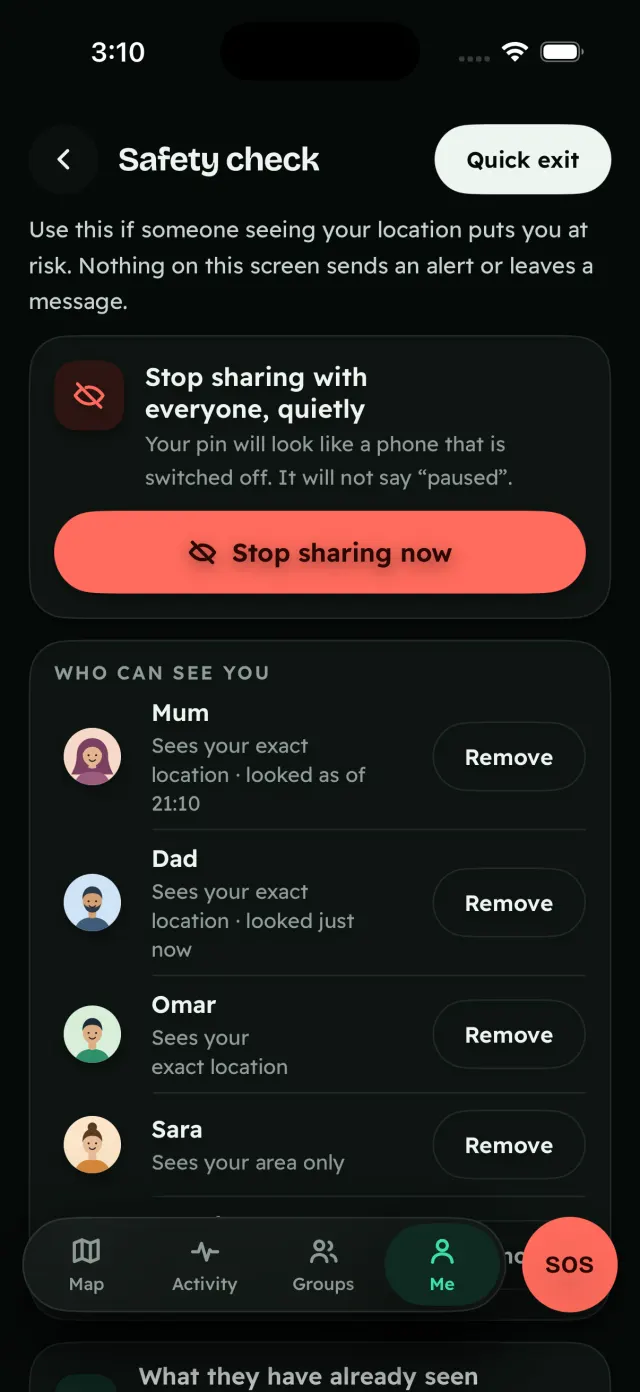
If someone seeing your location puts you at risk, Safety check stops sharing with everyone at once, and nothing on it sends an alert or leaves a message.

Safety check: stop sharing with everyone, quietly, so your pin looks like a phone that is switched off and never says “paused”. A quick-exit button, and the list of who can see you: Mum and Dad see your exact location, Omar too, and Sara, a friend, your area only, each with Remove. Nothing on this screen sends an alert or leaves a message.

17:55DrivingPlus

Mum drives home. No sign, no judgement.

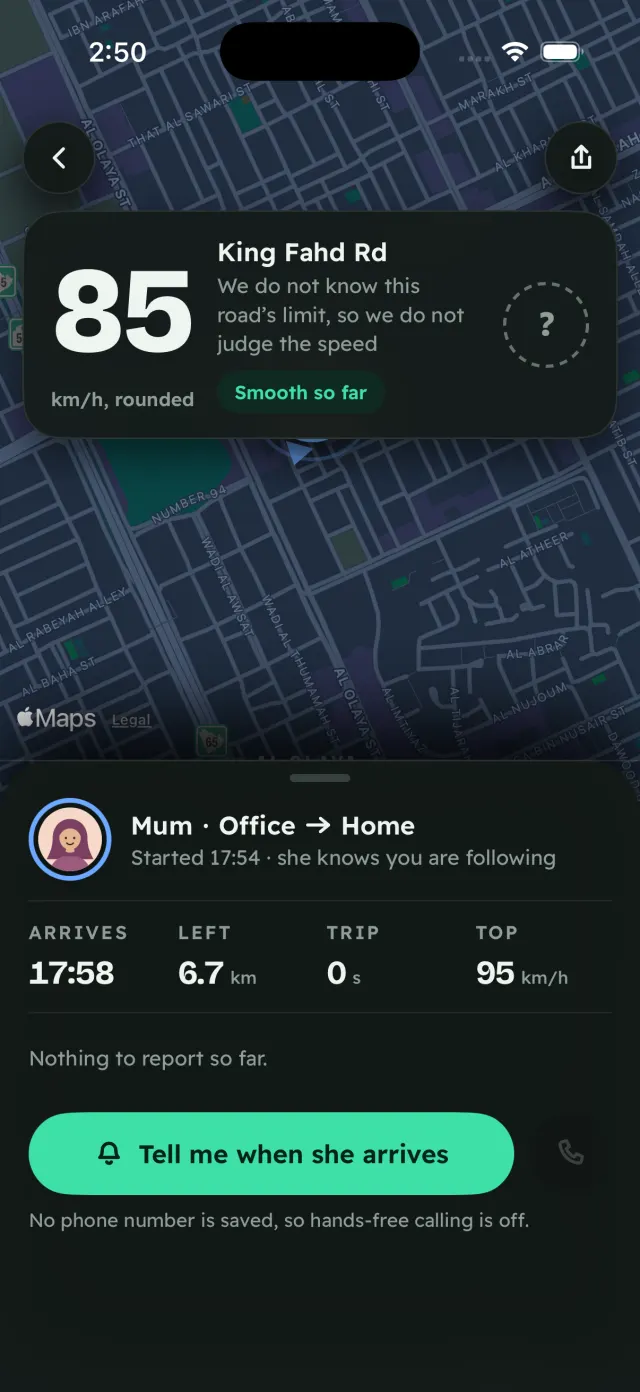
With Plus you see live driving status and speed, rounded to 5 km/h. The posted limit appears only where the limit is known.

  • The driver sees it first. The weekly driving report goes to the driver first.
  • “I was a passenger.” If you only rode along, the drive really is deleted from your record.

85

km/h, rounded to 5

A road whose limit we don’t know gets no sign, so there is nothing to be “over”.

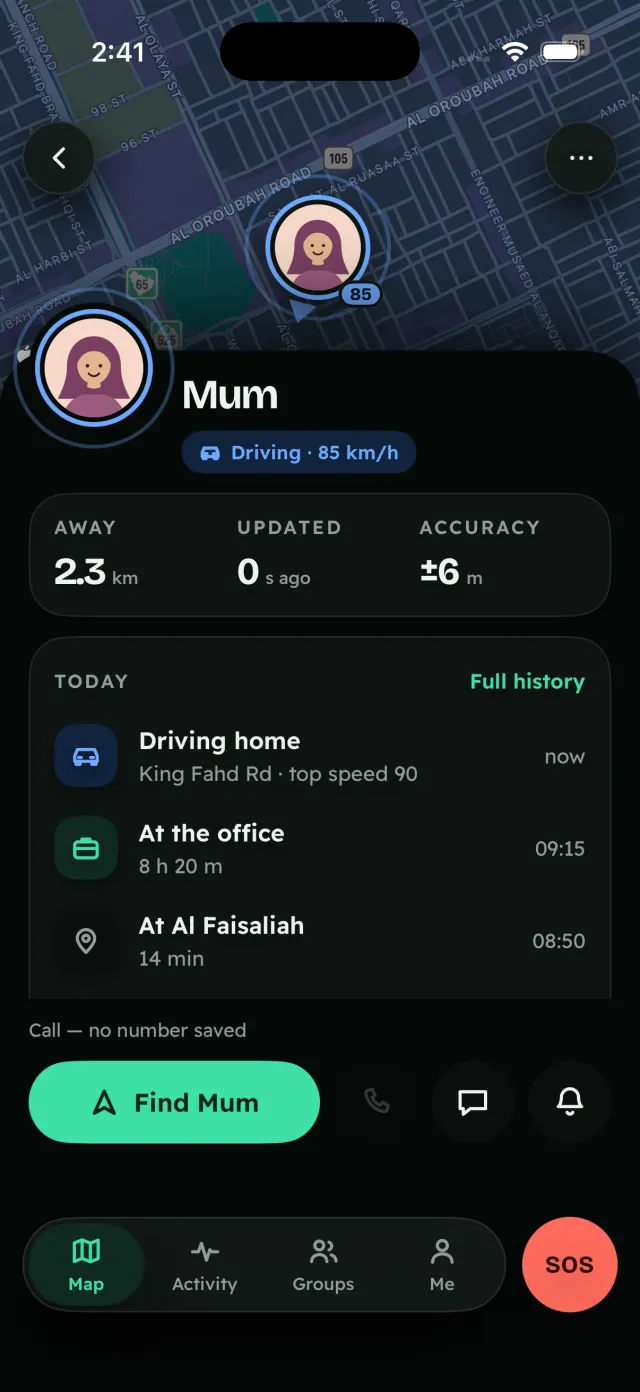
Mum’s live drive at night, from the office to home, started 17:54, and she knows you are following: 85 km/h, rounded, on King Fahd Rd, a dashed question-mark sign and the words “We do not know this road’s limit, so we do not judge the speed”; arriving 17:58 with 6.7 km left, and a button to be told when she arrives.

17:57Maghrib

After Maghrib, everyone wonders who’s home yet.

This is the hour TZX Locate was made for: one honest look at the map, and then back to your evening.

Who’s home?

  • OmarHome since 17:40
  • MumKing Fahd Rd · now
  • LinaHome since 17:54
  • DadOffice · now
  • TetaTeta’s house · 39 min ago · phone asleep
Drawn in the app’s design: the people list, the map’s text twin.
Mum’s card: driving at 85 km/h, 2.3 km away, updated 0 seconds ago, accuracy ±6 m. Today: driving home on King Fahd Rd now, top speed 90; at the office for 8 h 20 min from 09:15; at Al Faisaliah for 14 min at 08:50. A Find Mum button.

18:05Safe RideFree

Taxi home? You pick who follows the ride.

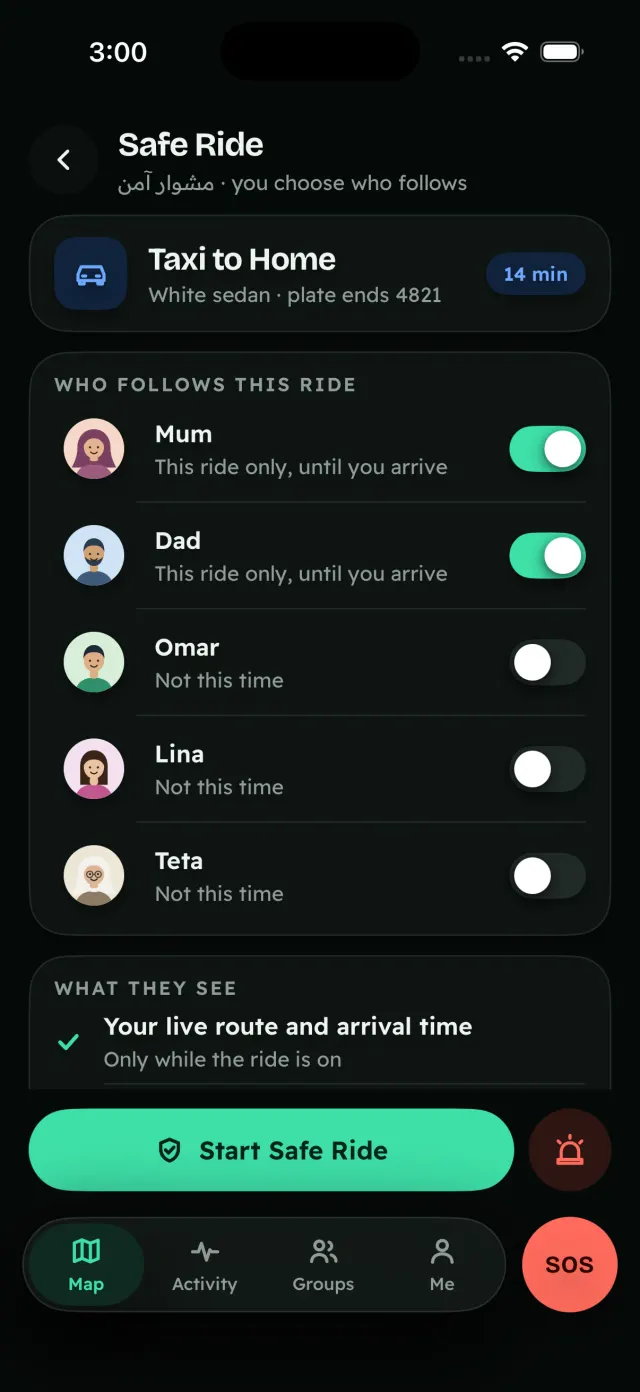
For the passenger in a taxi or ride-hail: Adam picks who follows this ride, and only this ride. The route, the ETA and an optional plate stay on his phone, and are deleted when he arrives.

It alerts if the car goes off-route or stops for too long.

Walking instead? Walk with me. Set a timer or a destination. Your route stays on your phone and is only shared if you don’t check in after a grace prompt.

The driver is never tracked, named or rated.

Safe Ride for a taxi to Home, a white sedan, plate ending 4821, 14 minutes: Mum and Dad follow this ride only, until you arrive; Omar, Lina and Teta are not following this time.

18:30SOSNever paywalled

SOS is never behind a paywall.

Adam didn’t need it tonight. It was one hold away the whole ride. Free, for everyone, on every plan.

  1. Hold to send, with a countdown and a way to cancel.
  2. Your people are alerted with your location and a Plus Code.
  3. A dial card with the local emergency number for the country you’re in. When it doesn’t know it, it says so.
  • A read-aloud script
  • Delivery and read receipts
  • A visible failure state
  • A lock-screen control
Demo · nothing is sent

Press and hold

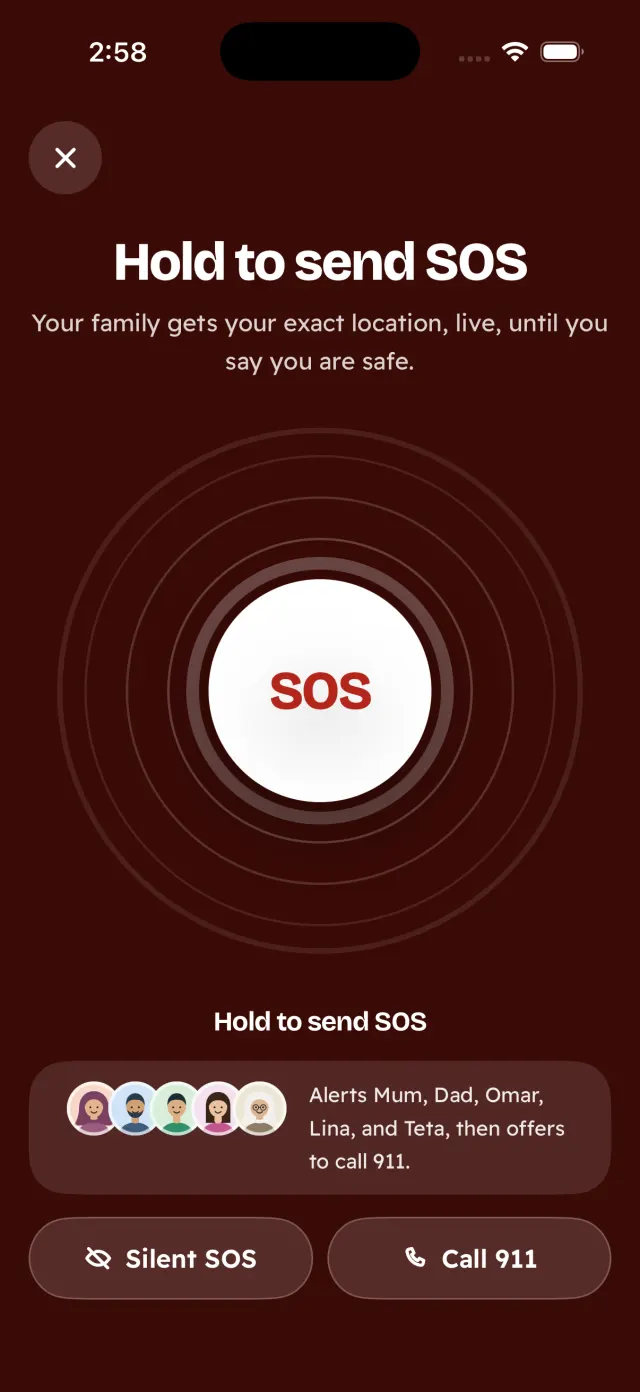
The Arabic SOS capture comes from a test build with no country set, so it says plainly that it doesn’t know the number yet.

The SOS screen: hold to send SOS; your family gets your exact location, live, until you say you are safe. It alerts Mum, Dad, Omar, Lina and Teta, then offers to call 911.

19:00When a phone goes quietFree

The same sentence reaches you and Teta. Nobody is accused of anything.

Teta was back on the map after her nap. At 18:30 her phone went quiet again. When a phone stops updating, both sides get the same sentence, never “hiding”.

  • Tracking Health. It checks the phone’s real settings, including the battery killers on Samsung, Xiaomi and Oppo, and shows the one fix instead of nagging.

    Battery saver is onThe one fix: turn it off for TZX Locate.

  • Low battery? The last good location is sent before the phone dies, plus nudges to charge.
On your phone

TZX Locate

Teta’s phone hasn’t updated for 30 minutes.

On Teta’s phone

TZX Locate

Teta’s phone hasn’t updated for 30 minutes.

Drawn from the app’s notification. The words are the app’s.

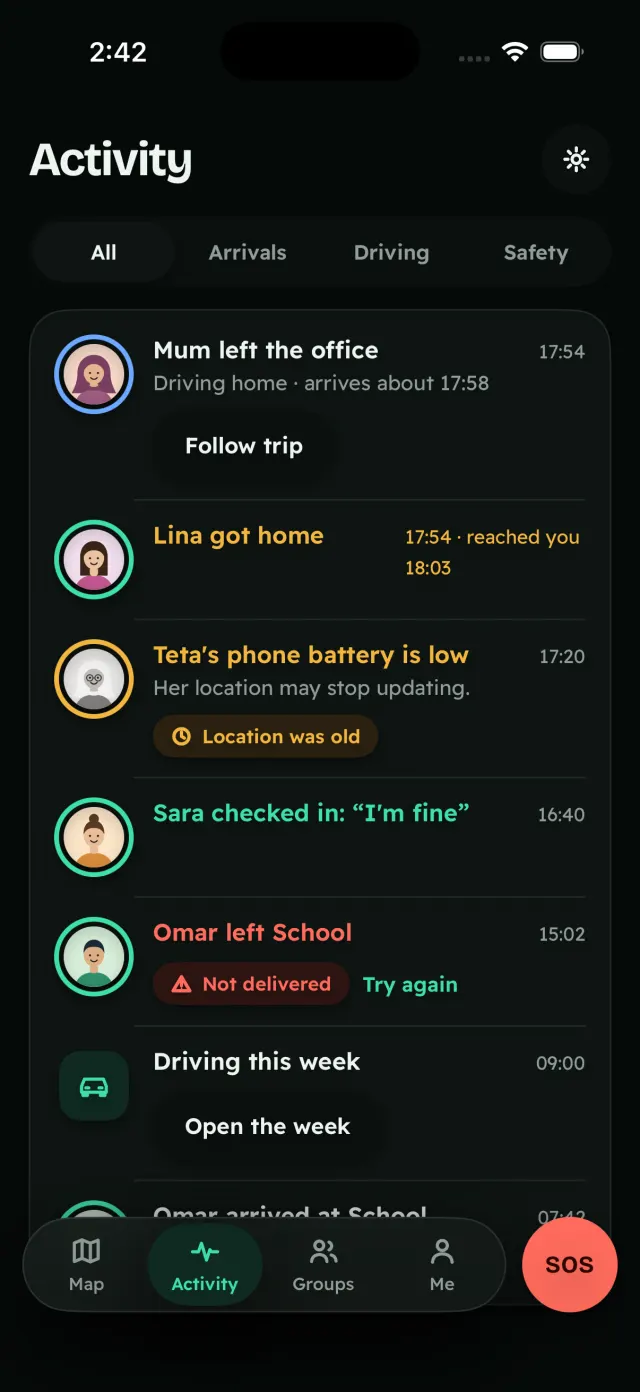
Activity: Mum left the office at 17:54, driving home, arriving about 17:58; Lina got home at 17:54 and the alert reached you at 18:03; Teta’s phone battery is low and her location may stop updating; Sara checked in: “I’m fine”; Omar left School, marked Not delivered, with Try again.

19:30Trips & convoysFree up to 12

One car leads. The others follow.

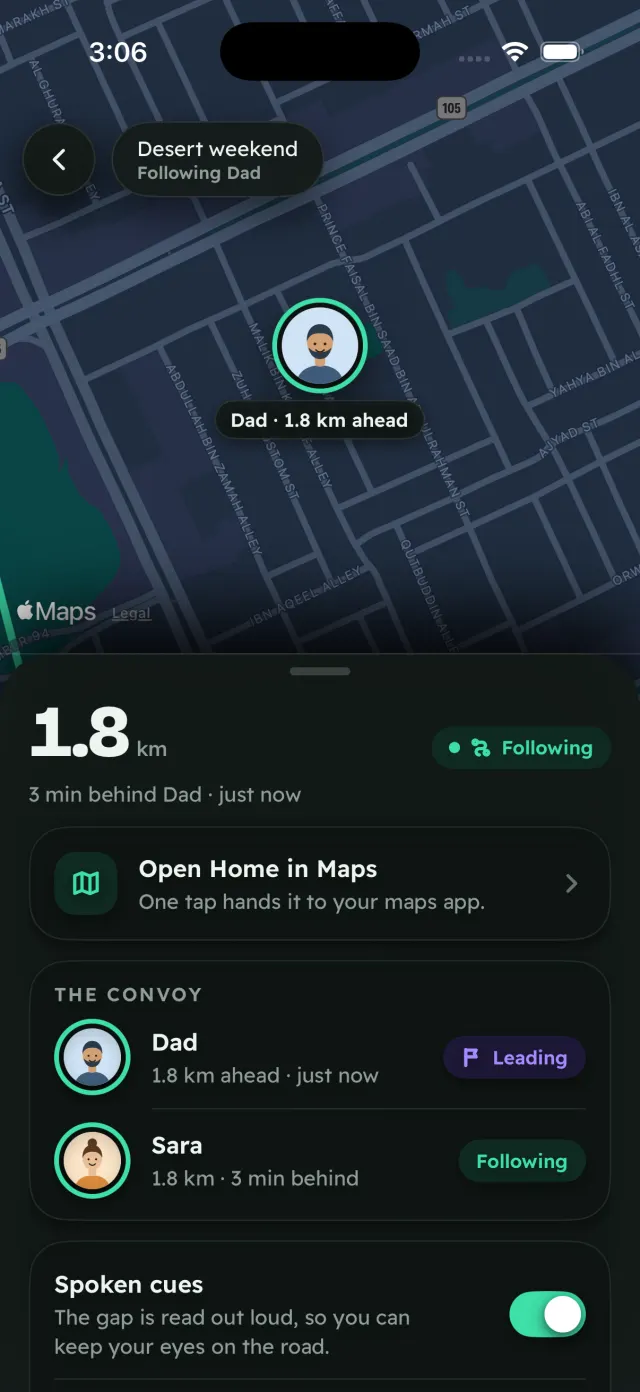
Tonight Dad sets up the desert weekend. On the road, one car taps Lead and the rest tap Follow: followers see the leader live, the exact trail he drove, and the gap in km and minutes.

Spoken cues keep it hands-free. If the leader sets a destination, one tap hands it to Apple Maps or Google Maps. TZX Locate doesn’t do turn‑by‑turn.

Plus adds a sweep car, falls-behind and stopped alerts, and bigger convoys.

1.8 km and 3 minutes behind Dad, on the exact trail he drove

On the road on Thursday: Sara follows Dad. Drawn in the app’s design.
On Thursday, following the leader on the desert weekend: following Dad, 1.8 km and 3 minutes behind, with a one-tap hand-off to your maps app and spoken cues switched on.

19:50Roll-call & talkFree up to 12

11 of 12. One to find.

Dad pins Thursday’s meeting point. At the car park, each “I’m here” fills the headcount ring, and the family talks in short voice clips.

  • A countdown header, and sharing that switches itself off at the end.
  • Auto-delete at the end, with a card to keep your household.
  • Free up to 12 people for 7 days, with voice.
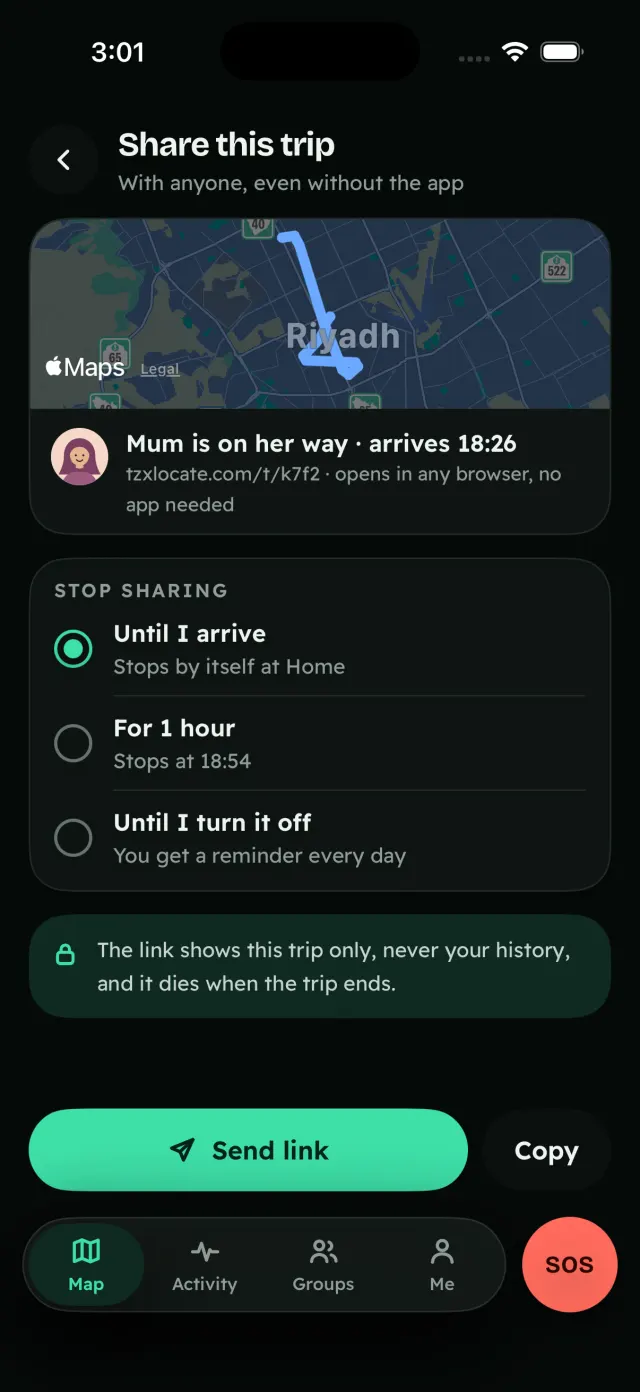
  • Share trip, with Plus: a guest link to follow one trip without installing. It expires with the trip and can be revoked.

The same for a family road trip, a school trip, a wedding weekend or an Umrah group.

Roll-call

Desert weekend · meeting point

11of 12

One to find.

  • One tap on “I’m here” fills the headcount ring.
  • A meeting pin with a countdown and a voice note.
  • Anyone without a phone gets ticked by hand.

Talk

Desert weekend · push to talk

  1. Sara0:06

    “We’re at the second car park”

    played
  2. Dad0:04

    played
  3. Omar0:03

    queued · retrying
  • Each press records a short clip that is queued, retried and played.
  • Clips stay quiet during prayer times.
Share this trip, with anyone, even without the app: Mum is on her way, arriving 18:26, with a link that opens in any browser, no app needed. Stop sharing until I arrive, for 1 hour, or until I turn it off. The link shows this trip only, never your history, and it dies when the trip ends. Send link or Copy.

20:30Finding each otherFree

The shape is how sure we are.

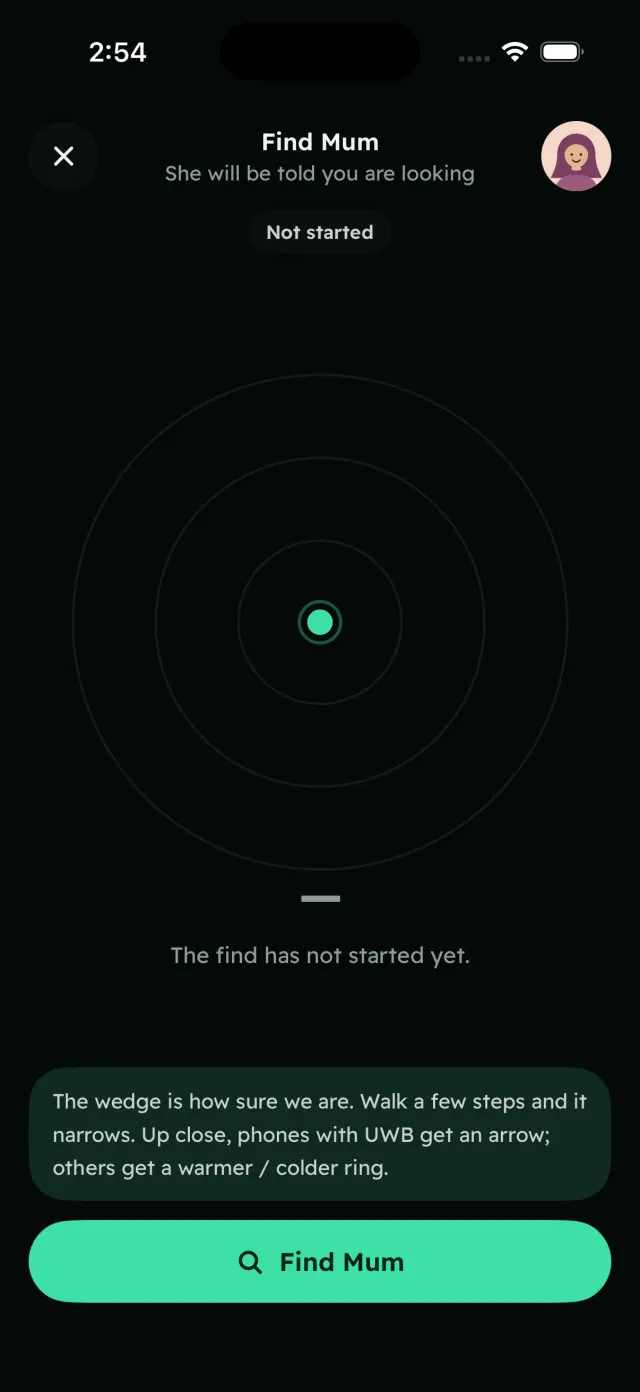
At the mall, Omar looks for Mum. The finder draws only what the two phones really know. Nothing sharper.

Talk-me-in: Mum is asked first and taps once. Her phone shows a colour and a code and can flash or chirp, a two-person voice line opens, and Omar sees direction and distance from GPS, with an honest accuracy note.

She is told you’re looking. Nothing is shared until she chooses.

Roughly here

We only know roughly where

The finder’s own screen, “Find Mum”: “She will be told you are looking”, rings around your dot, and the note “The wedge is how sure we are. Walk a few steps and it narrows. Up close, phones with UWB get an arrow; others get a warmer / colder ring.”

21:40Made for here

Jiddo reads it in Arabic, in large type.

Built for the Gulf, Arabic first: each person picks their own language inside the app, and Simple mode sets everything in large type.

اطمئنّ عليهم. بلا تجسّس عليهم.

The same promise, as the app ships it in Arabic. The chrome mirrors right to left; the world never does: the map, the compass, the finder arrow, speeds and clocks never flip.
  • Hijri dates

    A Hijri or Gregorian calendar, and a School Mode.

  • Quiet at prayer times

    Voice clips stay quiet during prayer times.

  • Addresses the way you write them

    Makani numbers, Plus Codes and Saudi short addresses such as RRRD2929.

  • The right emergency number

    Emergency numbers per country, and a plain word when it doesn’t know one.

  • Simple mode

    Large type, for Jiddo and Teta.

  • iPhone and Android

    One app each, same features, in Arabic and English, chosen per person.

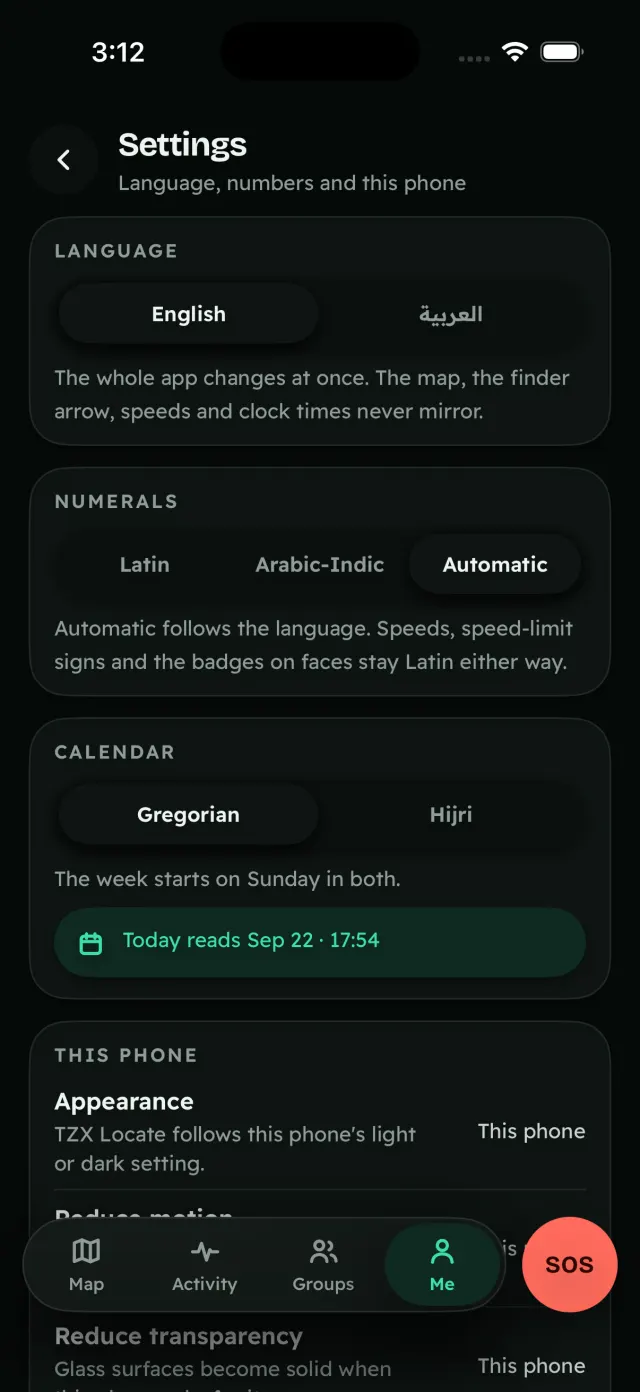
Settings: language English or Arabic, numerals Latin, Arabic-Indic or automatic, and a Gregorian or Hijri calendar.

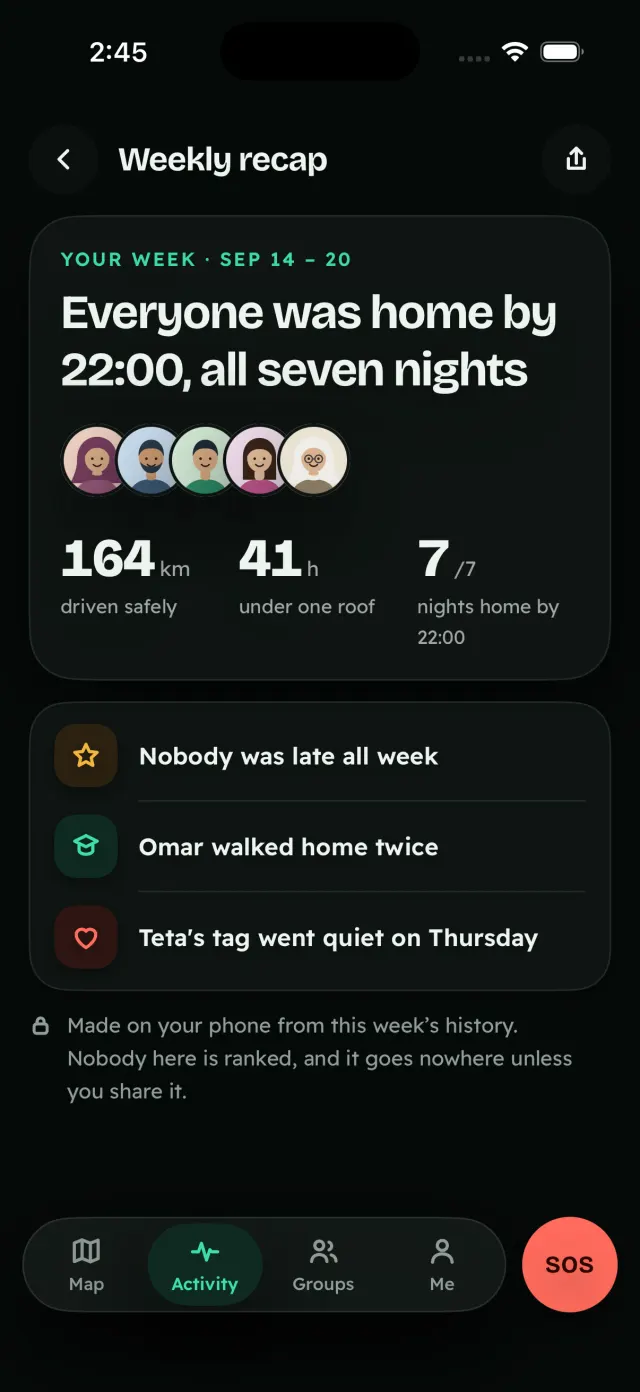
22:00Weekly recapFree

Everyone was home by 22:00, all seven nights.

A private, cheerful recap of your family’s week, made on your phone from this week’s history. Nobody is ranked, and it goes nowhere unless you share it.

That was one evening. The night goes on.

Weekly recap: “Everyone was home by 22:00, all seven nights”, 164 km driven safely, 41 hours under one roof, 7 of 7 nights home by 22:00.

Privacy

Never sold. No ads. No insurers.

No ads, ever — the subscription is the business.

  • You always see who is looking at you.

    Anything intrusive — a find, live speed, a group search — tells you first or as it happens. Consent is a screen, not a setting.

  • No third-party SDK ever receives your location.

    No analytics, ad or map SDK that uploads coordinates. On iPhone, the map is Apple MapKit.

  • Your history lives on your phone.

    7 days free, 30 days with Plus — not on our server. Places are checked on the phone, too.

  • Delete your account, any time.

    It is deleted from our live server at once, and our encrypted backups age out within 15 days. What your family’s phones already received stays on their phones.

What our server sees

A screen in the app shows exactly what our relay receives for one location update.

The envelope17:54
Group
Family
From
p-adam
Arrived
17:54
Size
148 bytes
The location itself
70c2 cee1 539d eaa7 89d5 9913
An opaque envelope, the time, the size and the group. Drawn from the app’s “What our server holds” screen; the values are an example.

We’ll only use the words “end-to-end encrypted” after an outside security review. Until then, the app shows you exactly what our server receives.

Things TZX Locate will never build

  • No stealth or hidden tracking
  • No fake or frozen location
  • No remote listening
  • No uninstall blocking
  • No monitoring of one adult by another
  • No ads or data partnerships
  • No public profiles or leaderboards
  • No face recognition
Every privacy promise

CompareAs of 25 September 2026

How TZX Locate compares.

Five of the twenty-three questions. Every other app’s cell comes from that company’s own pages, each with a source on the compare page.

QuestionTZX LocateAt launchApple Find MyGoogle MapsLife360WhatsAppSnapchat
See who looked at your locationYesAlways, livePartlyNot statedNot statedPartlyNot stated
Arrive and leave alerts, freeYesUnlimitedYesYes5 per personPartly2 places freeNot statedYesUp to 10 places
iPhone and Android togetherYesNoApple devicesYesYesYesYes
The app in ArabicYesArabic firstYesYesNoYesYes
Shows adsNoNeverNoYesYesPartlyIn Status and ChannelsYes

“Not stated” means the company’s pages don’t say, not that the feature is missing. The TZX Locate column describes the app at launch.

All 23 questions, with sources

Plans

Safety is free. Convenience is Plus.

Free

forever

SAR0

  • Live map with the Honest Dot
  • One family circle, up to 10
  • Unlimited place alerts
  • 7-day history
  • SOS, Safe Ride and check-in
  • The mirror, pause and the sharing ladder
  • Voice clips and the talk-me-in finder
  • Trips up to 12 people for 7 days, with voice

Plus

monthly or yearly

SAR19.99/ month

or SAR 149.99 a year · AED, same numbers

30 days free, no card

  • Driving: live speed, reports and history
  • The Bluetooth finder ring
  • No-show and schedule alerts
  • 30-day history, with export
  • Trips up to 50 people for 30 days, with co‑guides
  • Guest follow links and guide broadcast
  • Convoy extras: sweep car, falls-behind alerts

One price per payer covers every group they run. A reminder comes 3 days before the trial ends.

Trip Pass

once

SAR19.99

  • 30 days
  • The organiser pays
  • Members are free

For one trip — a school trip, a wedding weekend, an Umrah group — without a subscription.

SOS, check-in and safety alerts are never behind a paywall, and there is no upsell on the safety channel. No card up front.

Compare the plans

Questions

Straight answers.

Can I download TZX Locate now?

Yes, as a beta. On Android, the closed beta is open: ask to join the beta group, and once you’re approved, install it from Google Play. On iPhone, open the TestFlight invite; it asks you to install TestFlight first if you don’t have it. Or join the waitlist and we’ll email you once, when it’s out.

Could someone follow my location without me knowing?

No. You always see who is looking at you: a live “looking now” eye on your own pin, and a ledger of who found you, set alerts on you or checked your speed. TZX Locate will never build hidden tracking.

What does it cost?

Free, forever, covers the live map, one family circle up to 10, unlimited place alerts, 7-day history, SOS, Safe Ride, check-in, the mirror, voice clips, the talk-me-in finder and trips up to 12 people for 7 days. Plus is SAR 19.99 a month or SAR 149.99 a year, with 30 days free and no card. A Trip Pass is SAR 19.99 once, for 30 days; the organiser pays and members are free.

Does SOS call emergency services for me?

No. It alerts your people and shows you the local number to call. The dial card names the emergency number for the country you’re in, and says plainly when it doesn’t know it. SOS is never behind a paywall.

Where is my location history kept?

On your phone: 7 days on Free, 30 days with Plus. It isn’t kept on our server, and places are checked on your phone too.

Does it work between iPhone and Android?

Yes, one app each with the same features. Only the thin finder arrow, part of Plus, needs matching phones: it appears on a live Ultra Wideband link between two phones that both have UWB. Everyone else gets the wedge; with Plus, a Bluetooth warmer / colder ring too.

Why the careful words about encryption?

We’ll only use the words “end-to-end encrypted” after an outside security review. Until then, the app shows you exactly what our server receives.

In beta on iPhone and Android

Want evenings like this one?

TZX Locate is in beta on iPhone and Android. Try it now, or leave your email and we’ll write once, when it’s in the stores.

One email when the app is out. Nothing else. Privacy notice